


Mi LUMA
3.7405.00 Reviews
App Specs
- Version
- 1.18.8
- Updated On
- License
- Free
- Downloads
- 500,000+
- Developer
- Luma Energy Development
- Categories
- House & Home
- Platform
- Android
Screenshots
 Analysis by AppCompare
I judge a utility app less by how many buttons it has than by whether I can find the one I need when I’m busy, worried, or away from home. Mi LUMA is aimed at LUMA electricity customers in Puerto Rico, bringing account tasks and outage reporting into a phone app. That narrow purpose is also its main strength: it’s not trying to be a general home-energy dashboard, but a convenient place to handle a few practical jobs.
Useful when you need a quick account check
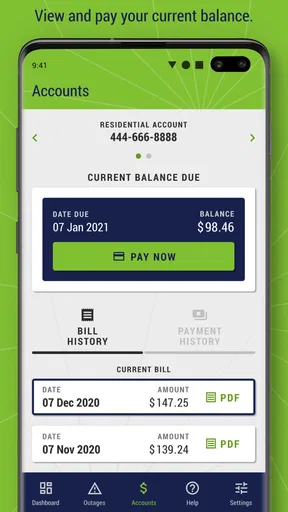
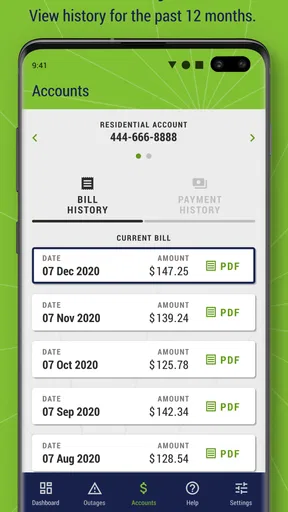
In an everyday situation, I might open the app while planning household expenses, check what I paid recently, then report an outage if the power goes out later. The 12-month bill and payment history gives that first task a helpful time span: it can make it easier to compare recent bills or confirm whether a payment appears in the account without digging through old emails or paper statements. I would still keep important payment confirmations somewhere I can access independently, rather than treating any single app as my only record.
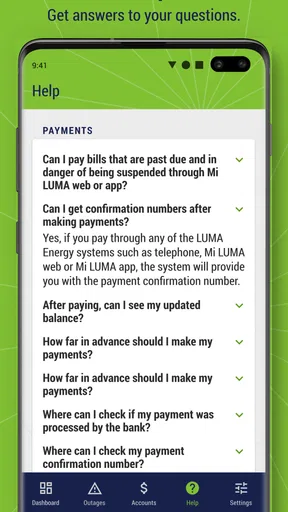
Paying through a phone is convenient when I’m already handling bills on the go, but it depends on having my account details and a reliable connection available. If I’m setting up access for the first time, I’d do it when I’m not rushed, so I have time to check that I’m using the right account. For a shared household, it is also worth agreeing on who will manage payments and keep track of confirmations; convenience can otherwise make it less clear who has handled the bill.
What the history is good for—and what it is not
A year of records is useful for looking back, not the same thing as a detailed energy-monitoring tool. I would use the history to spot broad changes between bills or answer a practical question about a past payment. I would not assume that it offers live appliance-level usage, detailed energy forecasts, or automatic ways to reduce consumption. If your goal is to understand which device is driving your electricity use, you will likely need a different source of information, such as a compatible home monitor or the details available on your bill.
That distinction matters because “managing energy” can mean two very different things: handling the account or analyzing consumption. Mi LUMA is most useful for the account side. Its bill and payment functions fit the common task of staying organized, while the outage reporting option serves a separate need when service is interrupted. Keeping those expectations modest helps the app feel practical rather than disappointing.
Outages: report them, but keep a backup plan
When the lights go out, reporting the problem from the phone can save a trip to a computer or a search for a paper contact number. I’d use the app to submit the report, then check back for relevant information rather than assuming that the initial screen tells the whole story. The app’s outage tools are useful as a channel for account-related action, but a phone app cannot restore electricity or guarantee that every status changes as quickly as conditions on the ground.
One practical habit is to prepare for access before an outage: know your sign-in details, keep your phone charged when possible, and avoid relying on a single online source for urgent updates. If mobile service or connectivity is also disrupted, an app may be unavailable at the moment it is most needed. For that reason, I would treat Mi LUMA as one part of a household outage plan, not the whole plan.
Worth Reading Before You Choose

EA SPORTS FC Mobile 26 Is a Bigger Football Game, but It Takes Time

Flipboard Shows What News Apps Must Do Beyond the Feed

Switching to Android Auto Means Rethinking Your Driving Routine

Google Calendar Makes a Crowded Week Easier to Manage

Ludo King Makes the Most of the Minutes Between Plans

Baby Panda World Brings Quick Play to Modern Phones, but Its Game Library Feels Busy
Getting Started with Mi LUMA
First things first, downloading and setting up Mi LUMA was a breeze. Available on both Android and iOS, it took me less than five minutes to download and set up my account. The app's interface is intuitive and user-friendly, making it easy for anyone to navigate through its features.
Exploring the Main Features
The app is primarily designed to help users manage their electricity accounts on the go. One of the standout features is the ability to view and pay bills directly from your phone. You can easily track your usage, which is super handy if you’re trying to cut down on your energy consumption. Plus, you can set up notifications to remind you of upcoming payments, so no more late fees!
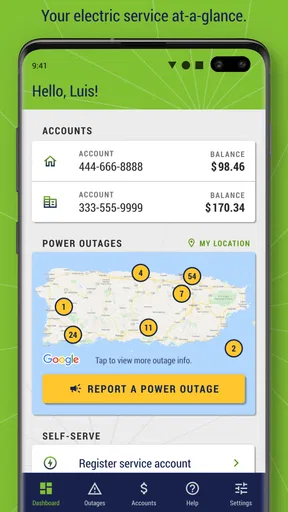
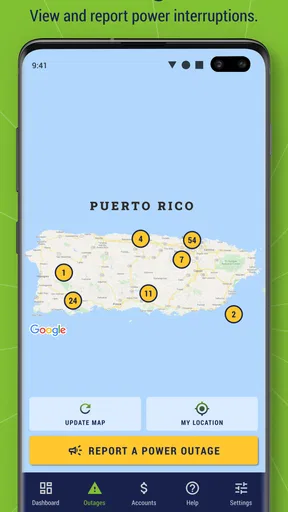
Another cool feature is the outage map. This is a real lifesaver during those unpredictable power cuts. It provides real-time updates on outages in your area, which helps you plan your day better. No more sitting in the dark wondering when the lights will come back on!
User Experience
Now, let’s talk about the user experience. The app runs smoothly without any noticeable lag, and the design is pretty sleek. Everything is laid out logically, so even if you’re not tech-savvy, you won’t find yourself lost in a maze of options. The color scheme is easy on the eyes, which is always a plus for prolonged usage.
What I really appreciate about Mi LUMA is the multilingual support. With both English and Spanish options available, it caters to a wider audience. It’s little details like this that make all the difference.
Readable, but still worth checking for yourself
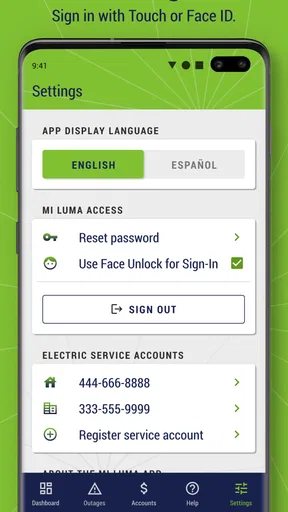
For a utility app, clear labels and a predictable path to common tasks matter more to me than decorative design. Mi LUMA’s straightforward layout makes bill and outage actions feel approachable, especially if you only open it occasionally. English and Spanish support is useful in a Puerto Rican household where people may prefer different languages; choosing the more comfortable option can reduce the chance of misunderstanding an account screen.
That said, ease of navigation is not the same as accessibility for every person. A color scheme that feels comfortable to me may not work equally well for someone with low vision or color-vision differences, and a tidy interface does not automatically mean text can be enlarged or every control works with assistive technology. If those details are essential for you, try the specific screens you need on your device before depending on the app for a time-sensitive payment.
Different abilities and situations
For someone with limited dexterity, completing a task on a phone may be easier than using a computer, but small touch targets, typing account information, or repeating a sign-in can also make the process harder. I’d avoid waiting until a bill is due to discover whether the sign-in flow is comfortable. If another trusted person helps manage household bills, agreeing on a safe and clear arrangement beforehand can reduce stress without casually sharing account credentials.
The app is also less useful when the phone itself is the obstacle: a depleted battery, unreliable data connection, or difficulty reading a small screen can turn a quick task into a frustrating one. A larger-screen device or a non-app account channel may be a better fit in those moments. For outage reporting, prepare the basic account access while service is available; that small bit of planning is more valuable than assuming the app will be reachable during every disruption.
Who will get the most from it
I’d recommend Mi LUMA to people who already manage a LUMA electricity account and want bill payment, a look back at account activity, and an app-based way to report service interruptions in one place. It is especially handy for someone who travels, lives between devices, or prefers taking care of household admin in short bursts rather than sitting down at a computer. The app is free, is rated for Everyone, and is developed by Luma Energy Development. Its current version is 1.18.6, and it requires Android 7.0 or later; iPhone users can also find it for iOS.
It is less compelling if you are not a LUMA customer, want a full home-energy analysis, or need a dependable outage channel that works without internet access. In those cases, a general budgeting tool, a dedicated energy monitor, or another available customer-service route may better match the task. The app has a 3.8 average from around 1,700 ratings, with about 398 written reviews, and has been installed over 500,000 times. I’d read that as evidence that many customers have tried it, not as a guarantee that every account or device will feel equally smooth.
Room for Improvement
Of course, no app is perfect, and Mi LUMA is no exception. While it generally performs well, there were a few times when the outage map didn’t update as quickly as I’d hoped. It’s not a deal-breaker, but something to keep in mind if you rely heavily on real-time updates.
Additionally, I noticed that the app occasionally logs you out unexpectedly. It’s a minor inconvenience, but having to log back in can be a bit annoying, especially if you’re in a hurry.
Those two issues affect different moments: delayed outage information can make planning less certain, while an unexpected logout interrupts routine account work. My workaround is to leave enough time for bill tasks instead of starting them at the last minute, and to check more than one reliable channel during a serious outage. If a login interruption happens, I would rather pause and re-enter account details carefully than rush through authentication on a small screen.
Final Thoughts
Overall, Mi LUMA is a solid app that delivers on its promises. It’s a must-have for anyone looking to manage their electricity account efficiently. With its user-friendly interface, comprehensive features, and real-time updates, it makes handling your energy usage much less of a headache.
Whether you’re paying bills, checking usage, or just keeping an eye on outages, Mi LUMA has got you covered. So, if you haven’t already, give it a try. It just might make managing your electricity a whole lot easier!
My recommendation is strongest for people who want a practical companion to their LUMA account, rather than a tool that explains every part of household energy use. The most sensible way to judge it is to try the exact actions you expect to need—checking a past payment, finding a bill, or reporting an outage—while you have time to learn the screens. For those everyday account jobs, it can remove a little friction; for accessibility needs, urgent outage planning, or deeper energy analysis, it is wise to keep a suitable alternative in reach.
Pros
- User-friendly interface for easy navigation.
- Real-time updates on power outages.
- Convenient bill payment options.
- Detailed usage reports help monitor consumption.
- 24/7 customer support availability.
Cons
- Occasional app crashes reported by users.
- Limited features on the free version.
- Requires stable internet for full functionality.
- Some users experience login issues.
- Notifications can be delayed at times.
FAQs for Mi LUMA
What is Mi LUMA and what are its main features?
Mi LUMA is a utility app designed to help users manage their electricity services efficiently. The app allows you to view your bill, make payments, track usage, and report outages. It also provides real-time updates on service interruptions and notifications about maintenance schedules, ensuring you stay informed about your electricity services.
How can I pay my electricity bill using Mi LUMA?
Paying your electricity bill through Mi LUMA is straightforward. Once you log in, navigate to the billing section where you can view your current bill and payment history. The app supports various payment methods, including credit/debit cards and bank transfers, allowing for secure and convenient transactions directly from your mobile device.
Is Mi LUMA available for both Android and iOS devices?
Yes, Mi LUMA is available for both Android and iOS platforms. You can download it from the Google Play Store for Android devices or the Apple App Store for iOS devices. The app is optimized for both operating systems, ensuring a smooth user experience regardless of your device type.
How do I report a power outage using Mi LUMA?
To report a power outage through Mi LUMA, simply go to the ‘Report an Outage’ section in the app. Here, you can submit details about the outage, including your location and any additional information that might assist in resolving the issue quickly. The app also provides status updates on reported outages.
Is my personal data safe with Mi LUMA?
Mi LUMA places a high priority on user privacy and data security. The app uses advanced encryption protocols to protect your personal and financial information. Regular security updates and compliance with data protection regulations ensure that your data remains safe while using the app for managing your electricity services.


